Position Management
FairTicks uses a fixed exposure model. You choose the exposure before entry, then manage the active position through one clear workflow: review official P&L and risk, update Stop Loss or Take Profit, apply quick protection, close, or reverse.
One market, one active position, one clear exposure. This keeps risk measurement, trade evaluation, and account analytics simple, transparent, and consistent.
See the Position Manager in practice
The Position Manager brings the active trade, official account context, protection controls, and position actions into one place. It is designed for deliberate management after entry rather than rapid order entry.
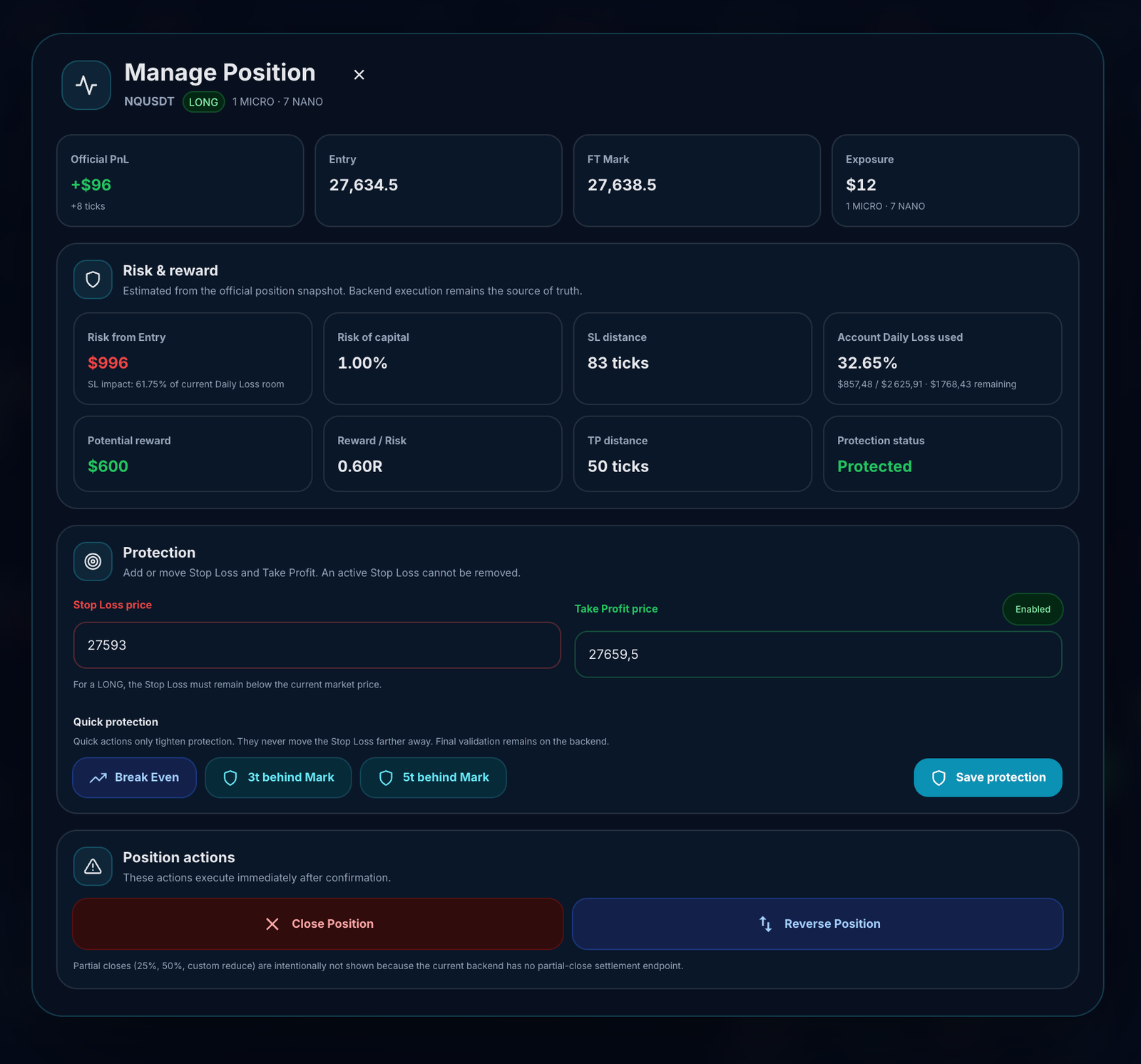
The Position Manager at a glance
Confirms exactly which position you are managing and shows the official account values that matter now.
Helps you compare the planned loss, potential reward, account impact, and current protection quality.
Review or update protection levels. Changes become official only after FairTicks validates and applies them.
One-click protection shortcuts that can only tighten risk when the position and current FT Mark allow a valid level.
Close settles the current trade. Reverse closes the active direction and requests a new position in the opposite direction.
The interface displays and requests changes. Official P&L, rule checks, execution, and account state remain authoritative on the FairTicks backend.
Fixed exposure model
A FairTicks position has a defined exposure from the moment it is opened. The selected exposure determines the position's simulated tick value, risk impact, and commission base.
Once the position is open, the exposure cannot be increased or reduced inside the same active position. To use a different exposure on the same market, the current position must be closed first.
You open BTCUSDT with $10 exposure.
That position remains a $10 exposure position until it is closed.
If you want $20 exposure, close the current position and open a new one with $20 exposure.
One active position per market
FairTicks allows only one active position per account and market at the same time. You can trade different markets simultaneously, but you cannot stack multiple positions on the same market.
| Scenario | Status | Reason |
|---|---|---|
| BTCUSDT + ETHUSDT | Allowed | Different markets. |
| BTCUSDT + XAUUSDT | Allowed | Different markets. |
| BTCUSDT Long + BTCUSDT Long | Not allowed | Same market already has an active position. |
| BTCUSDT Long + BTCUSDT Short | Not allowed | Same-market hedging is not supported. |
A new position can be opened on a market only when there is no active position already open on that same market.
Opening the Position Manager
Open the Open Positions section, find the active position you want to review, then click Manage on that position row.
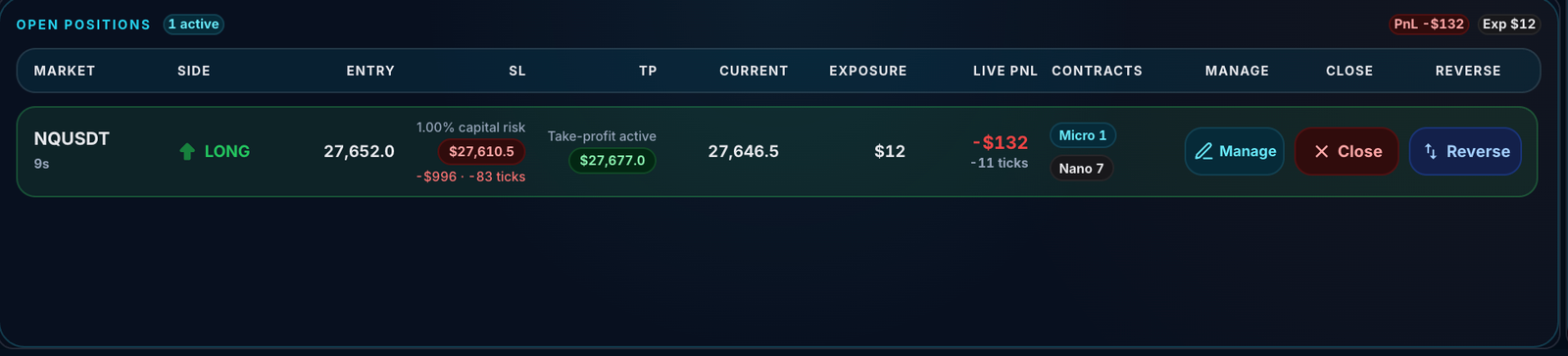
| Step | Action |
|---|---|
| 1 | Open the trading page and locate the Open Positions panel. |
| 2 | Confirm the market symbol and position direction. |
| 3 | Review Entry, SL, TP, Current price, Exposure, Live P&L, and Contracts. |
| 4 | Click Manage on the position row you want to modify. |
| 5 | The Position Manager opens for that exact active position. |
Close and Reverse are also available directly from the position row. Use Manage when you want the complete view with risk metrics, Stop Loss, Take Profit, Break Even, and the 3-tick or 5-tick protection actions.
Before changing protection or using a position action, verify the market symbol and direction shown in both the position row and the Position Manager header.
Position summary
The first row gives a fast snapshot of the active position.
| Item | Meaning |
|---|---|
| Official PnL | The current official unrealized result for the position, including the FairTicks tick result shown underneath. |
| Entry | The official entry price recorded when the position opened. |
| FT Mark | The official FairTicks reference used for position and risk context. |
| Exposure | The fixed exposure selected at entry, including the associated contract mix where displayed. |
The Position Manager does not replace official account calculations. FairTicks backend values remain the source of truth for P&L, exposure, risk rules, settlement, and account status.
Risk & Reward
Risk & Reward translates your current Stop Loss and Take Profit structure into trader-friendly metrics. These values help you review the position, but they do not override the official account rules.
| Metric | What it tells you |
|---|---|
| Risk from Entry | The estimated loss between Entry and the active Stop Loss for the current fixed exposure. |
| Risk of capital | The Entry-to-Stop risk expressed as a percentage of the account capital or configured position-risk basis. |
| SL distance | The distance between Entry and Stop Loss in FairTicks logical ticks. |
| Account Daily Loss used | How much of today's effective Daily Loss allowance has already been consumed by the account. |
| Potential reward | The estimated reward between Entry and the active Take Profit for the current exposure. |
| Reward / Risk | The potential reward divided by the planned Entry-to-Stop risk, shown as an R multiple. |
| TP distance | The distance between Entry and Take Profit in FairTicks logical ticks. |
| Protection status | A quick indication of whether the position currently has valid Stop Loss protection. |
Risk from Entry: $1,000
Potential reward: $2,500
Reward / Risk: 2.50R
Account Daily Loss used vs position risk
These are different concepts:
- Account Daily Loss used shows how much of the account's current daily allowance has already been consumed.
- Risk from Entry shows the planned Entry-to-Stop loss for this specific position.
A position can have a defined Stop Loss risk while the account has also consumed Daily Loss from previous trades or other active positions.
Protection controls
The Protection section lets you review or request changes to the active Stop Loss and Take Profit.
| Control | Behavior |
|---|---|
| Stop Loss price | Defines the active loss-exit level. A valid change must stay on the permitted side of the current market for the position direction. |
| Take Profit price | Defines the active profit-exit level. It may be enabled or updated when the requested value passes validation. |
| Save protection | Sends the requested Stop Loss and Take Profit values for backend validation and application. |
Editing an input does not change the position by itself. Treat the new level as official only after FairTicks confirms the update.
Quick Protection
Quick Protection provides one-click Stop Loss actions. These actions only tighten protection. They never intentionally move the Stop Loss farther away to increase risk.
Break Even
Break Even moves the Stop Loss to the official Entry price. It is available only when the current market position and existing Stop Loss allow Entry to be used as a valid, tighter protection level.
LONG Entry: 27,623.5
FT Mark has moved above Entry.
Break Even requests: SL = 27,623.5
3t behind Mark
This action places the Stop Loss three FairTicks logical ticks behind the current FT Mark:
- For a LONG:
new SL = FT Mark − 3 logical ticks. - For a SHORT:
new SL = FT Mark + 3 logical ticks.
It becomes available only when the position has enough favorable movement for the calculated Stop Loss to remain beyond Entry, on the valid side of FT Mark, and tighter than the current Stop Loss.
5t behind Mark
This action uses the same logic but places the Stop Loss five FairTicks logical ticks behind FT Mark. It gives the position more room than the three-tick option while still locking protection when sufficient profit exists.
The 3t and 5t actions calculate a new Stop Loss from FT Mark at the time of the request. The Stop Loss does not continue following the market automatically afterward.
Why a Quick Protection action can be disabled
A quick action can be unavailable when:
- The position has not moved far enough into profit.
- The calculated Stop Loss would remain on the wrong side of Entry.
- The calculated Stop Loss would be invalid relative to FT Mark.
- The existing Stop Loss already provides equal or better protection.
- Required price or logical-tick data is unavailable.
- Another protection update is already being processed.
Saving a protection change
| Step | What to do |
|---|---|
| 1 | Review Entry, FT Mark, current Stop Loss, and Take Profit. |
| 2 | Enter a valid Stop Loss or Take Profit, or choose an available Quick Protection action. |
| 3 | Review the requested level and any confirmation message. |
| 4 | Click Save protection or confirm the selected quick action. |
| 5 | Wait for FairTicks confirmation before treating the new protection as active. |
Close Position
Close Position requests a full close of the active position. After confirmation and settlement:
- The position becomes closed.
- Unrealized P&L becomes realized according to official settlement.
- The position's exposure is released.
- Account statistics and applicable rules update.
- A new position on the same market can be opened only after the close is completed and all checks pass.
Close Position affects the active trade after confirmation. Always verify the market and position direction before confirming.
Reverse Position
Reverse Position closes the current position and requests a new position in the opposite direction, subject to the normal FairTicks validations.
Current position: NQUSDT LONG
Reverse requested.
FairTicks closes the LONG, then requests a new NQUSDT SHORT using the supported reverse workflow.
A reverse is not the same as holding both directions at once. Same-market hedging remains unsupported.
Backend validation and source of truth
The Position Manager is the interface through which you review and request changes. The FairTicks backend remains authoritative for:
- Official P&L and tick result.
- Entry and FT Mark references.
- Stop Loss and Take Profit validation.
- Risk-per-trade limits.
- Daily Loss, Maximum Loss, and drawdown rules.
- Position close and reverse execution.
- Exposure release and settlement.
- Account status and trading permissions.
Every requested modification is validated before it is applied to the position. If a request is rejected, the last confirmed position state remains official.
Can I add more exposure to an open position?
No. FairTicks does not support adding exposure to an existing open position. This is commonly known as scaling in or pyramiding.
Open BTCUSDT with $5 exposure.
Price moves in your favor.
Try to increase the same position to $10 exposure.
Result: Blocked. The current position must be closed first.
Can I reduce exposure inside an open position?
No. The exposure selected at entry remains fixed until the position is fully closed. FairTicks does not currently support partial exposure reduction inside the same active position.
If you want to reduce your exposure on that market, close the current position and open a new one with a smaller exposure, as long as your account status and risk rules allow it.
Closing and reopening creates a new position. The new position must pass all normal checks, including market availability, account status, exposure capacity, contracts, balance, Stop Loss requirements, and risk rules.
How to change exposure on the same market
To use a different exposure on a market where you already have an active position, follow this process:
| Step | Action | What happens |
|---|---|---|
| 1 | Review the current position | Check direction, exposure, PnL, Stop Loss, and account risk state. |
| 2 | Close the current position | The existing exposure is released after the close is processed and settled. |
| 3 | Choose the new exposure | Select the exposure that matches your updated trading plan. |
| 4 | Open a new position | The new position opens only if all account and risk checks pass. |
Why FairTicks uses this model
The fixed exposure model is intentional. It is designed to keep the evaluation environment clean and measurable.
| Benefit | What it means for the trader |
|---|---|
| Clear risk measurement | Each position has one defined exposure from entry to exit. |
| Transparent trade evaluation | The position is evaluated using the exact conditions selected before entry. |
| Cleaner account analytics | Performance, risk, exposure, and behavior are easier to measure consistently. |
| No hidden stacking | Traders cannot layer multiple same-market entries into one unclear risk profile. |
| More stable trading engine | The platform avoids complex average-price and partial-position logic that can create confusion. |
| Fairer evaluation structure | Every trader follows the same position-management framework. |
FairTicks does not evaluate how aggressively a trader can stack exposure after entry. It evaluates whether the trader can plan, size, manage, and close trades under clear rules.
What is not supported
The following same-market position actions are not supported while a position is already active:
| Action | Supported? | What to do instead |
|---|---|---|
| Add more exposure to the current position | No | Close the position and open a new one with higher exposure. |
| Reduce part of the current exposure | No | Close the position and open a new one with lower exposure. |
| Open another position on the same market | No | Close the current same-market position first. |
| Hold Long and Short on the same market | No | Close the current direction before opening the opposite direction. |
| Use different exposures on the same market at the same time | No | Use one active exposure per market. |
What is supported
You can still manage your trading activity across markets and account resources.
| Action | Supported? | Notes |
|---|---|---|
| Trade multiple different markets | Yes | Each market can have one active position. |
| Choose exposure before entry | Yes | The selected exposure is fixed for that position. |
| Close a position manually | Yes | Closing releases exposure after settlement. |
| Open a new position after closing | Yes | The new position must pass all account checks. |
| Switch direction after closing | Yes | Close the current position, then open the opposite direction if allowed. |
| Update Stop Loss | Yes | The requested level must pass backend validation. |
| Update or enable Take Profit | Yes | The requested level must pass backend validation. |
| Move Stop Loss to Break Even | Yes, when eligible | Entry must be a valid tighter Stop Loss relative to the current market and existing protection. |
| Place Stop Loss 3 or 5 ticks behind FT Mark | Yes, when eligible | The position must have enough favorable movement and the new level must improve protection. |
| Reverse the active position | Yes | The current position is closed before the opposite direction is opened through the reverse workflow. |
Examples
Example 1 — increasing exposure
Current position: ETHUSDT Long with $10 exposure
Desired exposure: $20 exposure
Required action: Close ETHUSDT Long, then open a new ETHUSDT position with $20 exposure.
Example 2 — reducing exposure
Current position: XAUUSDT Short with $30 exposure
Desired exposure: $10 exposure
Required action: Close XAUUSDT Short, then open a new XAUUSDT position with $10 exposure.
Example 3 — trading multiple markets
BTCUSDT Long with $10 exposure
ETHUSDT Short with $5 exposure
SOLUSDT Long with $5 exposure
Result: Allowed, because each position is on a different market.
Common mistakes to avoid
| Mistake | Why it creates confusion | Better approach |
|---|---|---|
| Trying to add exposure after the trade works | FairTicks does not support scaling in. | Choose the intended exposure before entry. |
| Trying to partially reduce the position | The position exposure is fixed until close. | Close fully, then reopen with the desired exposure. |
| Opening a second position on the same market | Only one active position per market is allowed. | Close the existing same-market position first. |
| Trying to hedge the same market | Long and Short cannot be active on the same market at the same time. | Close the current direction before opening the opposite one. |
| Assuming exposure changes instantly after clicking close | Exposure is released after the close is processed and settled. | Wait for the position to close and check account status before reopening. |
Common questions
“Can I add to a winning position?”
No. FairTicks does not support adding exposure to an active position. Close the current position first, then open a new one with the desired exposure.
“Can I reduce only part of my position?”
No. Partial exposure reduction is not currently supported. To reduce exposure, close the position and open a new one with lower exposure.
“Can I open two positions on BTCUSDT?”
No. Only one active position per market is allowed. If BTCUSDT already has an active position, another BTCUSDT position is blocked.
“Can I be Long and Short on the same market?”
No. Same-market hedging is not supported. You must close the current position before opening the opposite direction.
“Can I trade several markets at the same time?”
Yes. You may hold positions on multiple different markets, as long as each market has only one active position and your account respects all exposure and risk rules.
“What does Break Even do?”
Break Even requests a Stop Loss at the official Entry price. It is enabled only when Entry is a valid tighter protection level.
“Do 3t and 5t behind Mark keep following the market?”
No. They make a one-time Stop Loss adjustment using the current FT Mark at the time of the request.
“Why is a Quick Protection button disabled?”
The position may not have enough favorable movement, the calculated level may not be valid, or the existing Stop Loss may already provide equal or better protection.
“Does editing the Stop Loss input update it immediately?”
No. The edit becomes official only after you save or confirm it and FairTicks accepts the requested level.
“What is Account Daily Loss used?”
It shows how much of today's effective Daily Loss allowance has already been consumed by the account. It is different from the Entry-to-Stop risk of the current position.
“What happens when I reverse?”
FairTicks closes the current position and then requests the opposite direction through the supported reverse workflow. It does not keep both Long and Short open together.
“Why does FairTicks use fixed exposure?”
Fixed exposure keeps every trade measurable from entry to exit. It supports clearer risk tracking, simpler account analytics, and a consistent evaluation structure for all traders.
Summary
FairTicks position management follows a clear structure: choose exposure before entry, keep one active position per market, review official P&L and risk, manage Stop Loss and Take Profit, use eligible Quick Protection actions, then close or reverse through backend-validated workflows.
FairTicks keeps exposure fixed while giving you clear, backend-validated tools to protect, close, or reverse the active position.
Plan the exposure before the trade.
A FairTicks position keeps one fixed exposure from entry to settlement. Use the Position Manager to review official risk, update protection, apply eligible quick actions, close the trade, or reverse through the supported validation flow.