DOM Ladder
The FairTicks DOM Ladder is a real-time market depth tool that helps traders read liquidity around the current price. It shows bids, asks, spread, depth, imbalance, and your active FairTicks trade levels such as Entry, Stop Loss, and Take Profit.
The DOM Ladder is a decision-support tool. It helps you understand liquidity, execution context, and risk distance before and during a trade. It should support your plan, not replace it.
See the DOM Ladder in practice
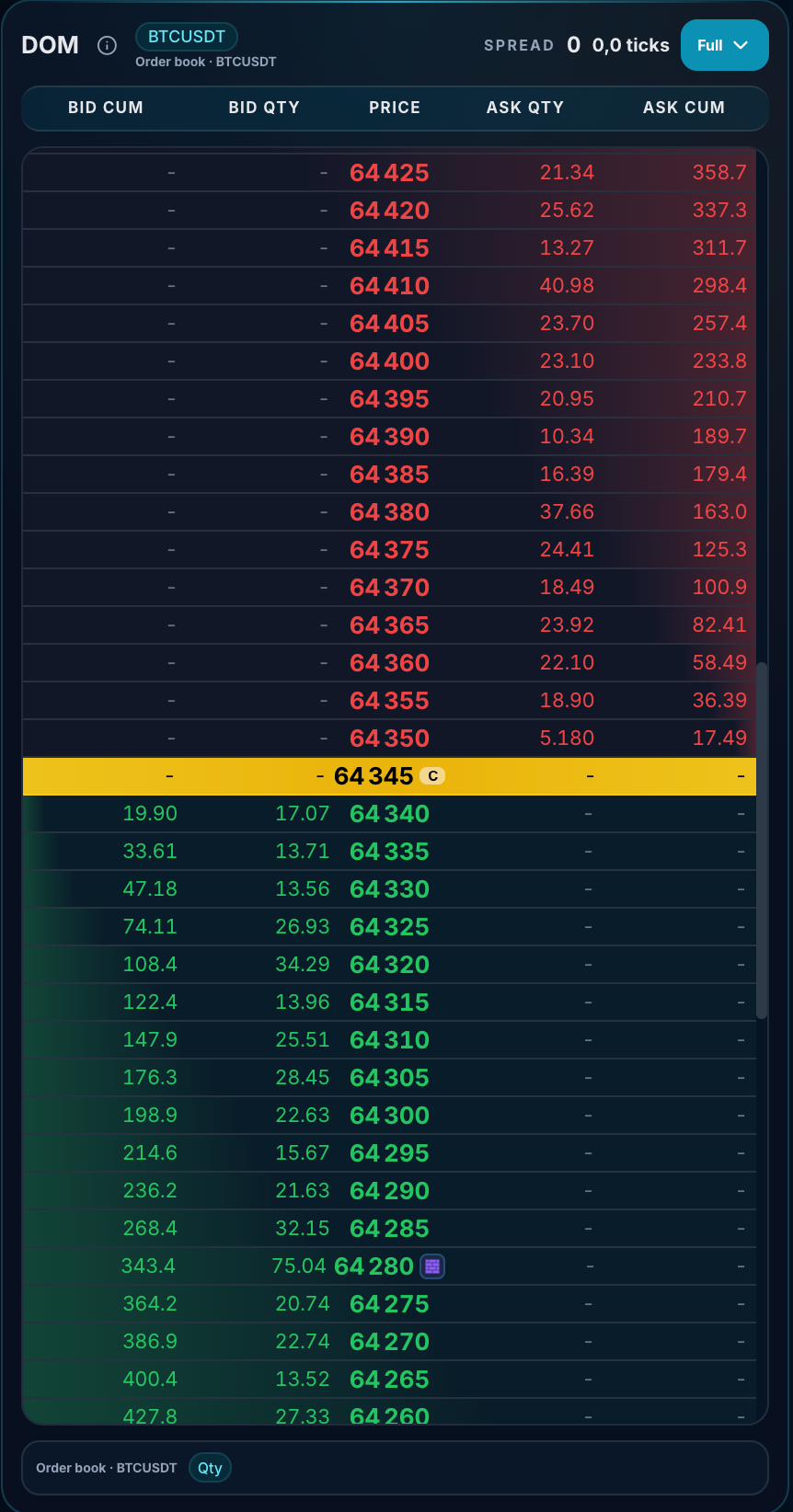
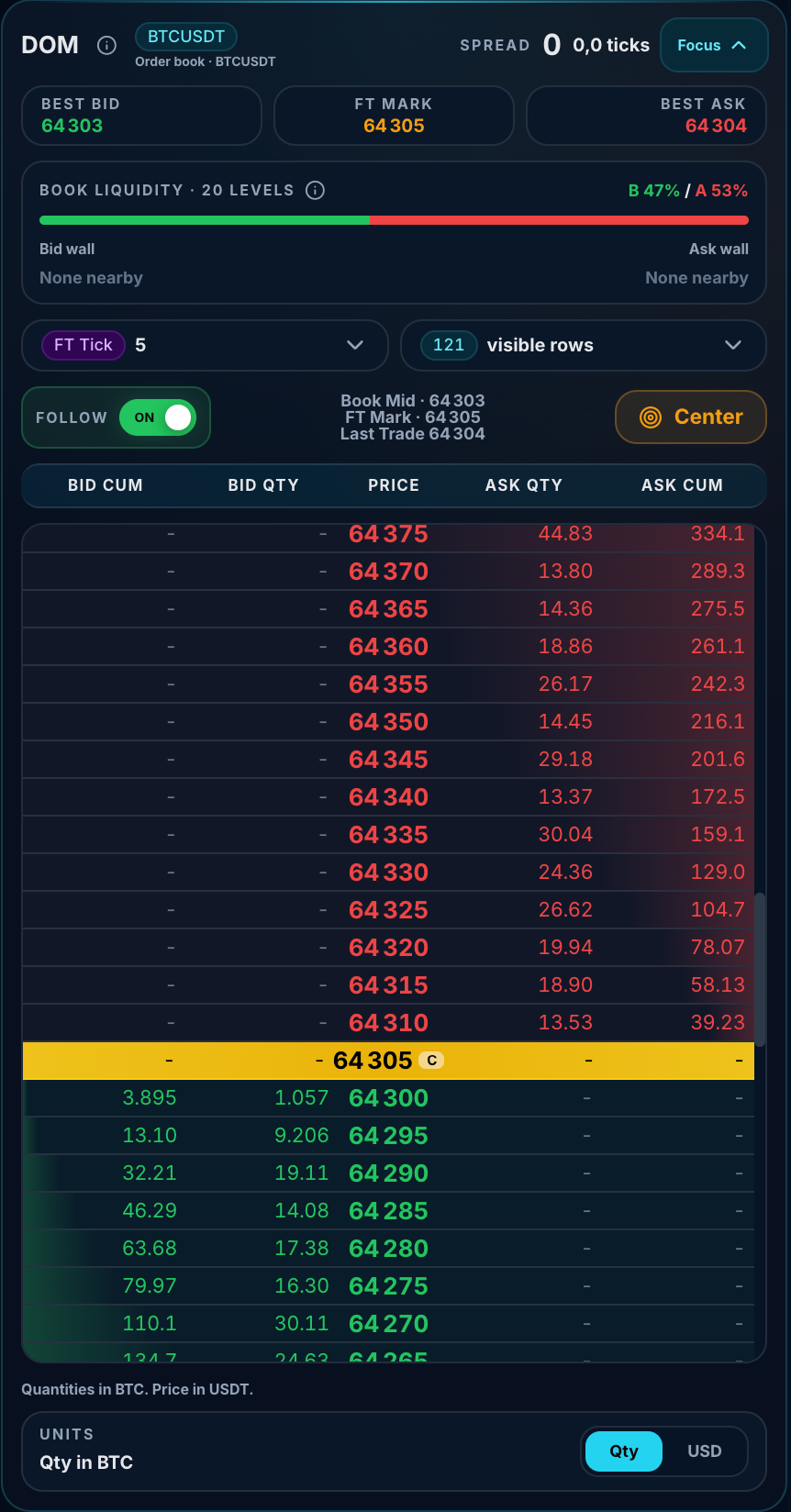
The screenshots below show the same FairTicks DOM concept in two layouts. The ladder-first layout gives more vertical space to prices, while the expanded layout exposes the market references, liquidity summary, grouping, rows, Follow, Center, and unit controls.
What DOM means
DOM stands for Depth of Market. It shows visible buy and sell liquidity at different price levels around the current market price. FairTicks displays it as a vertical ladder so you can read nearby price levels quickly.
A chart shows how price moved over time. The DOM shows where visible buyers and sellers are currently waiting around price.
Beginner, intermediate, and advanced use
The DOM can be useful at every level, but each trader should focus on the information that matches their experience.
| Trader level | What to focus on first | What to avoid |
|---|---|---|
| Beginner | Spread, current price area, bid side, ask side, Entry / SL / TP markers. | Do not react to every small movement in the ladder. |
| Intermediate | Depth, cumulative totals, imbalance, liquidity walls, FT Tick distance. | Do not treat one large bid or ask as guaranteed support or resistance. |
| Advanced | Liquidity concentration, absorption clues, liquidity pull, fast imbalance shifts, repeated level behavior. | Do not trade from DOM behavior alone without risk context and account discipline. |
DOM vs chart vs risk panel
The DOM is not a replacement for the chart or account risk panel. Each tool answers a different question.
| Tool | Main question | Best used for |
|---|---|---|
| Chart | Where has price been? | Trend, structure, candles, support/resistance, review. |
| DOM Ladder | Where is visible liquidity now? | Spread, depth, liquidity, current pressure, execution context. |
| Position panel | What is my active trade? | Entry, size, exposure, contracts, SL, TP, PnL. |
| Risk panel | How close am I to account limits? | Daily loss, max loss, drawdown, near-breach, remaining buffer. |
Main parts of the DOM Ladder
The FairTicks DOM Ladder can include:
- Best Bid, Book Mid, Best Ask, and Spread.
- Bid Size, Bid Total, Ask Size, and Ask Total columns.
- Current price row.
- Live / FT Tick / manual grouping controls.
- Rows selector.
- Follow and Center controls.
- Entry, Stop Loss, and Take Profit markers.
- Out-of-view badges for distant Entry / SL / TP levels.
- Bid depth, ask depth, and imbalance summary.
Visual walkthrough of the current DOM
Confirms the selected symbol, identifies the order-book source, shows the current spread, and provides the Full / Focus layout control.
Best Bid and Best Ask describe the nearest visible book prices. FT Mark is the FairTicks reference used for official position and risk context.
FairTicks summarizes the nearby visible book across a fixed group of levels so you can compare both sides quickly. A wall is a notably large visible level relative to nearby liquidity, not a guaranteed support or resistance level.
Grouping controls the price step used by each row. Visible rows control depth on screen. Follow keeps the ladder near live price; Center returns the view to the current book area.
Quantity shows liquidity at one level. Cumulative quantity shows how visible liquidity adds up as levels move away from the current market area.
The highlighted center row separates nearby asks above from nearby bids below and keeps the current reference easy to locate while the book updates.
Understanding the DOM columns
| Column | Meaning | How to read it |
|---|---|---|
| Bid Total | Cumulative visible buy depth. | Total visible buy liquidity accumulated up to that level. |
| Bid Size | Visible buy quantity at one specific price level. | A larger value means more visible buy interest at that exact level. |
| Price | The price level in the ladder. | Current book area, Entry, SL, and TP markers appear around this column. |
| Ask Size | Visible sell quantity at one specific price level. | A larger value means more visible sell interest at that exact level. |
| Ask Total | Cumulative visible sell depth. | Total visible sell liquidity accumulated up to that level. |
Best Bid, Best Ask, Book Mid, and Spread
At the top of the DOM Ladder, FairTicks shows key market reference values.
| Element | Meaning | Why it matters |
|---|---|---|
| Best Bid | The highest visible buy price. | The closest price where buyers are currently waiting. |
| Best Ask | The lowest visible sell price. | The closest price where sellers are currently waiting. |
| Book Mid | The midpoint between best bid and best ask. | A useful reference to center the ladder around the current book area. |
| Spread | The distance between best ask and best bid. | A tight spread usually means cleaner entry and exit conditions. A wide spread requires more caution. |
| Mark Price | A platform/reference price displayed for context. | Useful for comparing order book context with FairTicks price/risk references. |
book_mid = (best_bid + best_ask) / 2
How to read bids and asks
Bid side
The bid side shows visible buy interest. If a price level has a large bid size, it means more visible buy liquidity exists at that level. This can be useful when reading possible support, absorption, or buyer interest around a level.
Ask side
The ask side shows visible sell interest. If a price level has a large ask size, it means more visible sell liquidity exists at that level. This can be useful when reading possible resistance, supply, or seller pressure around a level.
Large visible liquidity can slow price, attract price, be absorbed, move away, or become a key area to watch. The value of the DOM is in observing how liquidity behaves, not only where it appears once.
Understanding spread
The spread is the difference between the best ask and the best bid. It shows how tight or wide the current market is.
Best Bid: 78,212.4
Best Ask: 78,212.5
Spread = 0.1
A tight spread usually means the market is easier to enter and exit. A wide spread may indicate lower liquidity, faster movement, or less efficient execution.
Always check the spread before opening a position. A trade idea can look good on the chart, but a wide spread can make the entry less efficient.
Understanding depth
Depth refers to visible quantity in the order book. FairTicks shows both individual level size and cumulative total.
| Metric | Question it answers | Example use |
|---|---|---|
| Bid Size | How much buy liquidity is at this exact price? | Checking buyer interest near a possible support area. |
| Ask Size | How much sell liquidity is at this exact price? | Checking seller interest near a possible resistance area. |
| Bid Total | How much buy depth exists across nearby bid levels? | Understanding the visible strength of the buy side. |
| Ask Total | How much sell depth exists across nearby ask levels? | Understanding the visible strength of the sell side. |
Understanding imbalance
Imbalance compares visible bid depth and visible ask depth. It gives a quick reading of whether the visible order book is heavier on the buy side or sell side.
If bid depth is much larger than ask depth, imbalance may be positive.
If ask depth is much larger than bid depth, imbalance may be negative.
A positive imbalance can suggest stronger visible buy-side pressure. A negative imbalance can suggest stronger visible sell-side pressure. The most useful reading often comes from watching how imbalance changes as price approaches important levels.
Book Liquidity and nearby walls
In the expanded DOM, the Book Liquidity card compares visible bid and ask quantity across the nearby levels used by the interface. It is designed as a fast context summary rather than a prediction.
| Element | What it shows | How to use it |
|---|---|---|
| B % | The bid-side share of the nearby visible liquidity included in the summary. | Use it to see whether the displayed nearby book is currently heavier on the buy side. |
| A % | The ask-side share of the nearby visible liquidity included in the summary. | Use it to see whether the displayed nearby book is currently heavier on the sell side. |
| Bid wall | The nearest notably large visible bid level, when one is detected. | Watch whether it remains, moves, refreshes, or is traded through. |
| Ask wall | The nearest notably large visible ask level, when one is detected. | Watch whether buyers absorb it, price rejects from it, or the liquidity disappears. |
| None nearby | No nearby level currently meets the wall threshold used by the display. | It does not mean the book is empty; it means no exceptional nearby concentration is being highlighted. |
A liquidity wall can be reduced, cancelled, moved, refreshed, or traded through. Treat the wall indicator as live context, not as a promise that price will stop at that level.
Live mode, FT Tick mode, and manual grouping
The FairTicks DOM Ladder can display the order book using different grouping modes. Grouping controls how price levels are combined into ladder rows.
| Mode | What it does | Best used for |
|---|---|---|
| Live | Uses a finer market-based grouping close to real order book movement. | Reading fast short-term movement and detailed nearby liquidity. |
| FT Tick | Uses the FairTicks logical tick of the selected market. | Understanding movement in FairTicks risk, PnL, and tick-distance terms. |
| Manual grouping | Allows custom grouping such as 0.1, 1, 5, or 10. | Zooming in or out depending on volatility and trading style. |
By default, the DOM Ladder opens in FT Tick mode. This aligns the ladder with the FairTicks logical tick system and makes price distance easier to understand inside the platform.
Why FT Tick mode exists
FairTicks uses logical ticks to normalize movement and risk across markets. FT Tick mode helps traders read the market through the same logic used by FairTicks for tick distance, risk, and PnL context.
- It makes Entry-to-current-price distance easier to read.
- It makes Stop Loss distance easier to understand in tick terms.
- It reduces micro-noise by grouping prices into meaningful FairTicks steps.
- It helps connect market movement to FairTicks PnL and risk logic.
Why some rows may be empty in FT Tick mode
In Live mode, each row usually represents a tighter price area, so the ladder often looks more filled. In FT Tick mode, each row may represent a larger logical movement.
If BTC has a logical tick of 5, each FT Tick row may represent a 5-point price step.
With 61 rows, the ladder can cover roughly 305 points of price area.
Because the ladder covers a wider range, some rows may not contain visible bid or ask liquidity.
Empty rows in FT Tick mode usually mean the selected grouping covers a wider price range than the visible liquidity available at that moment.
Rows control
The Rows control changes how many price levels are visible in the DOM Ladder. A smaller number of rows gives a tighter and cleaner view. A larger number of rows shows more depth but can be visually heavier.
| Rows setting | How it feels | Best used for |
|---|---|---|
| 21 / 25 / 31 | Compact and focused | Fast reading around the current price. |
| 41 / 61 | Balanced depth | General DOM usage and FT Tick view. |
| 100 / 121 where available | Deep view | Inspecting wider liquidity zones or distant trade levels on screens that can support the additional rows. |
Follow ON, Follow OFF, and Center
Follow mode controls whether the DOM Ladder automatically follows the current book price.
| Control | Meaning | Best used when |
|---|---|---|
| Follow ON | The ladder automatically recenters around the current book area when needed. | You want to stay focused on live price movement. |
| Follow OFF | The ladder does not automatically jump back to the current price. | You want to inspect a specific area, such as SL, TP, or a liquidity zone. |
| Center | Manually recenters the DOM around the current book price. | You inspected another area and want to return to the live price. |
Saved DOM preferences
FairTicks saves your DOM preferences locally. This means your selected grouping, rows count, and Follow mode remain active after refresh.
Your DOM settings should not reset when you:
- Refresh the trading page.
- Switch from one market to another.
- Switch from one account to another.
- Open a new position.
- Close a position.
- Reverse a position.
Entry, Stop Loss, and Take Profit markers
When you have an active FairTicks position, the DOM Ladder can display your important trade levels directly inside the price ladder.
| Marker | Meaning | How it helps |
|---|---|---|
| E / ENTRY | Your position entry price. | Shows where the trade started relative to the live book. |
| SL | Your Stop Loss price, if one exists. | Shows where the trade is protected or invalidated. |
| TP | Your Take Profit price, if one exists. | Shows where the trade aims to lock profit. |
Only the latest active position is shown
The DOM Ladder is linked to the selected account and selected market. It shows the latest active position that matters now.
If you close a position and open another one, the DOM updates to the new position. If you reverse a position, the old Entry and SL should disappear, and the DOM should show only the new active Entry and SL.
When a level is outside the visible ladder
Sometimes your Stop Loss or Take Profit may be far from the current market price. In that case, it may not be visible inside the current ladder window.
E 78,820 — Entry is outside the current visible ladder.
SL 77,040 — Stop Loss is outside the current visible ladder.
TP 79,120 — Take Profit is outside the current visible ladder.
Clicking the badge centers the DOM Ladder on that price level so you can inspect it directly. When this happens, Follow may turn OFF so the ladder does not immediately jump back to the current price.
Beginner workflow: how to use the DOM simply
If you are new to DOM trading, do not try to read everything at once. Start with a simple four-step workflow.
| Step | Question | What to check |
|---|---|---|
| 1 | Is the market tight or wide? | Check Spread. |
| 2 | Where are buyers and sellers? | Check Bid Size and Ask Size around current price. |
| 3 | Is one side heavier? | Check Bid Total, Ask Total, and Imbalance. |
| 4 | Where are my trade levels? | Check Entry, SL, and TP markers. |
You want to open a long position.
Spread is tight, bid depth is stable, and your Stop Loss is visible at a reasonable FT Tick distance.
This does not mean the trade must be taken, but the DOM gives you cleaner execution context than entering blindly.
Intermediate workflow: using DOM before a trade
Before opening a position, the DOM can help you evaluate execution context.
| Question | DOM element to check | Why it matters |
|---|---|---|
| Is the spread acceptable? | Spread | A wide spread can make entry less efficient. |
| Is the entry area liquid enough? | Bid Size / Ask Size | Thin liquidity can make price movement unstable. |
| Is the market one-sided? | Imbalance | Strong imbalance can show short-term visible pressure. |
| Am I buying into a large sell wall? | Ask Size / Ask Total | Large ask liquidity above price may slow or challenge upward movement. |
| Am I selling into a large buy wall? | Bid Size / Bid Total | Large bid liquidity below price may slow or challenge downward movement. |
| Is my stop distance logical? | FT Tick / Active Levels | FT Tick mode helps read distance in FairTicks terms. |
Advanced liquidity behavior
Advanced traders can use the DOM to observe how visible liquidity behaves as price approaches important areas. The key is not only where liquidity appears, but whether it stays, moves, disappears, gets absorbed, or refreshes.
| Visible behavior | What it may suggest | How an advanced trader may read it |
|---|---|---|
| Large bid wall below price | Visible buyer interest at that area. | Watch whether price respects it, trades through it, or whether the size moves away. |
| Large ask wall above price | Visible seller interest at that area. | Watch whether buyers absorb it or price rejects from it. |
| Liquidity disappears before price reaches it | Liquidity pull or reduced interest. | Can warn that the visible level may be less reliable than it looked seconds earlier. |
| Price trades into size but does not move through | Possible absorption. | Look for repeated pressure into the level and whether the level keeps holding. |
| Same level keeps refreshing | Possible repeated supply or demand at that area. | Can be an area to watch closely for continuation or rejection. |
| Imbalance flips quickly | Fast shift in visible pressure. | Can signal a short-term change in liquidity conditions. |
Advanced DOM reading is about behavior over time: how liquidity reacts as price approaches, tests, absorbs, or rejects an area. One snapshot is useful. The sequence is usually more important.
Example — reading a possible absorption area
Imagine price moves up into a large ask area several times.
Current price area: 78,200
Large visible ask liquidity: 78,205
Price touches the area several times but does not break through immediately.
Ask size reduces, refreshes, then reduces again.
A beginner may simply see a “sell wall.” An advanced trader watches the behavior: is the wall rejecting price, or is it being absorbed over repeated attempts?
Example — reading a liquidity pull
Imagine a large bid appears below price, then disappears as price approaches it.
Current price area: 78,300
Large visible bid liquidity: 78,280
Price starts moving down toward 78,280.
The large bid size suddenly reduces or disappears.
This can change the trader's read of the market. The level that looked strong a moment earlier may now be less supportive, so the trader should reassess the trade context.
How the DOM helps during an open trade
Once a position is open, the DOM can help you manage context. It shows where price is relative to visible liquidity and relative to your active FairTicks levels.
For a long position
- Check whether bid depth below price remains supportive.
- Watch whether ask liquidity above price is being absorbed or rejecting price.
- Be careful if bid depth disappears and ask depth becomes dominant.
- Use the E / SL / TP markers to stay aware of your trade structure.
- Use FT Tick mode to understand the movement in FairTicks distance terms.
For a short position
- Check whether ask depth above price remains strong.
- Watch whether bid liquidity below price is being absorbed or defending the level.
- Be careful if ask pressure disappears and bid depth becomes dominant.
- Use FT Tick mode to understand how far price has moved in FairTicks terms.
- Do not chase every ladder movement without a plan.
DOM Ladder and FairTicks risk discipline
FairTicks is built around disciplined trading behavior. The DOM Ladder supports that philosophy by helping traders understand execution context before acting.
If the spread is wide, liquidity is thin, and the account is already close to a risk limit, the trader should review the account state carefully before adding exposure.
The goal is not to click faster. The goal is to make better decisions with clearer information.
Pre-trade DOM checklist
1. Is the spread acceptable?
2. Is the entry area liquid enough?
3. Is there a large liquidity wall directly against my trade?
4. Is imbalance supporting or contradicting my idea?
5. Is my Stop Loss logical relative to current price movement?
6. Does the trade still respect my account limits?
7. Am I using the right DOM mode: Live for detail, FT Tick for FairTicks distance?
Common mistakes when using the DOM
| Mistake | Why it is risky | Better behavior |
|---|---|---|
| Buying only because bid depth is large | Large bids can change quickly. | Use bid depth as context, not as the full reason for entry. |
| Selling only because ask depth is large | Large asks can change quickly. | Watch how price reacts to that liquidity area. |
| Ignoring spread | Wide spread can reduce execution quality. | Check spread before opening or closing. |
| Reacting to every DOM movement | Can lead to overtrading and emotional decisions. | Use the DOM to support a predefined setup. |
| Using too many rows without purpose | Can create noise and reduce focus. | Use deeper rows only when you need wider context. |
| Forgetting account rules | A good trade idea can still violate risk rules. | Always check exposure, Daily Loss, Max Loss, and drawdown limits. |
Common questions
“Should beginners use the DOM?”
Yes, but beginners should keep it simple. Start with spread, bids, asks, and active trade markers. Do not try to interpret every liquidity movement immediately.
“What should pro traders look for?”
Pro traders can use the DOM to observe liquidity walls, absorption behavior, liquidity pull, imbalance shifts, and how visible size behaves when price approaches important areas.
“Is a large bid wall always support?”
It is an important area to watch, but the useful information comes from how price reacts to it. Watch whether the size holds, moves, refreshes, or gets traded through.
“Is a large ask wall always resistance?”
It can be a meaningful area, but the reaction matters. Watch whether price rejects from it, absorbs it, or breaks through it.
“Why does the ladder sometimes look empty in FT Tick mode?”
FT Tick mode groups price into FairTicks logical steps. When the grouping covers a wider price range, some rows may not contain visible liquidity at that moment.
“Why did my Entry or SL disappear from the DOM?”
The DOM shows the latest active position for the selected account and market. If the position was closed, reversed, or replaced by a new position, the marker updates accordingly.
“Can I click an out-of-view badge?”
Yes. Clicking an out-of-view badge can center the DOM around that price level so you can inspect Entry, SL, or TP directly.
“Should I use Live mode or FT Tick mode?”
Use Live mode when you want detailed short-term order book movement. Use FT Tick mode when you want to understand movement in FairTicks logical tick and risk terms.
Summary
The FairTicks DOM Ladder helps traders read visible liquidity around the current market area. It shows bids, asks, spread, depth, imbalance, and active trade levels such as Entry, Stop Loss, and Take Profit.
Beginners can use it to understand spread, bids, asks, and trade levels. Intermediate traders can use it to evaluate depth, imbalance, and execution context. Advanced traders can use it to observe liquidity behavior, absorption clues, liquidity pull, and fast shifts in visible pressure.
The DOM Ladder helps you understand live liquidity, FairTicks tick distance, and active trade levels before you enter, manage, or exit a position.
The DOM Ladder helps you read liquidity before you act.
Use it to understand spread, depth, imbalance, active trade levels, and liquidity behavior — then combine that information with your trading plan and FairTicks account rules.