DOM Focus Mode
DOM Focus Mode gives the price ladder more room by reducing secondary market, liquidity, grouping, and display controls. Essential information remains visible so you can keep reading the live book without changing trading logic.
One control, one clear state. Focus Mode simplifies the workspace while keeping the symbol, spread, ladder, current reference, and active trade markers available.
Full controls and ladder-first view
The DOM can be used in a control-rich layout or in a ladder-first layout. The market data does not change when you switch layouts; only the amount of interface chrome around the ladder changes.
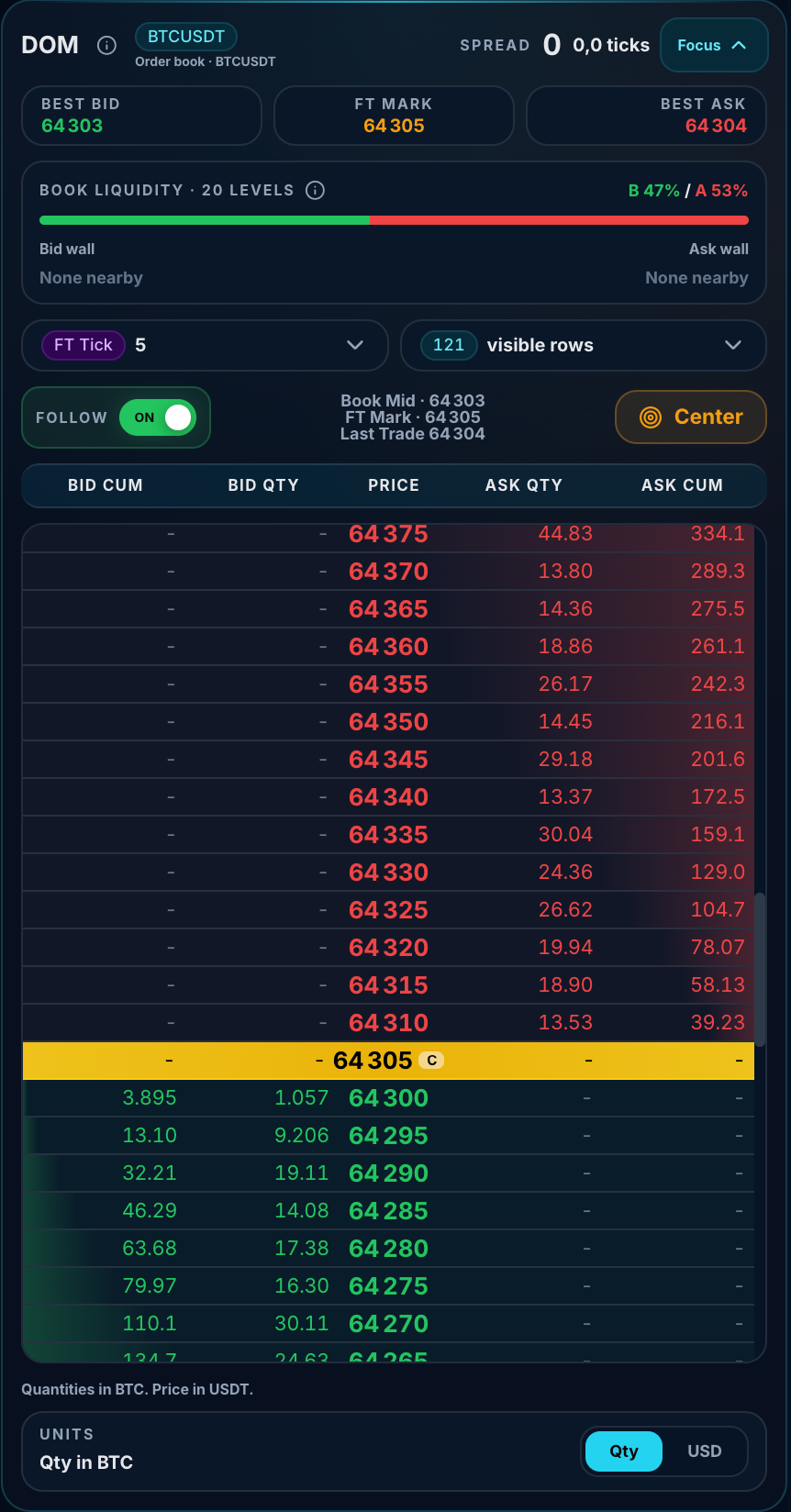
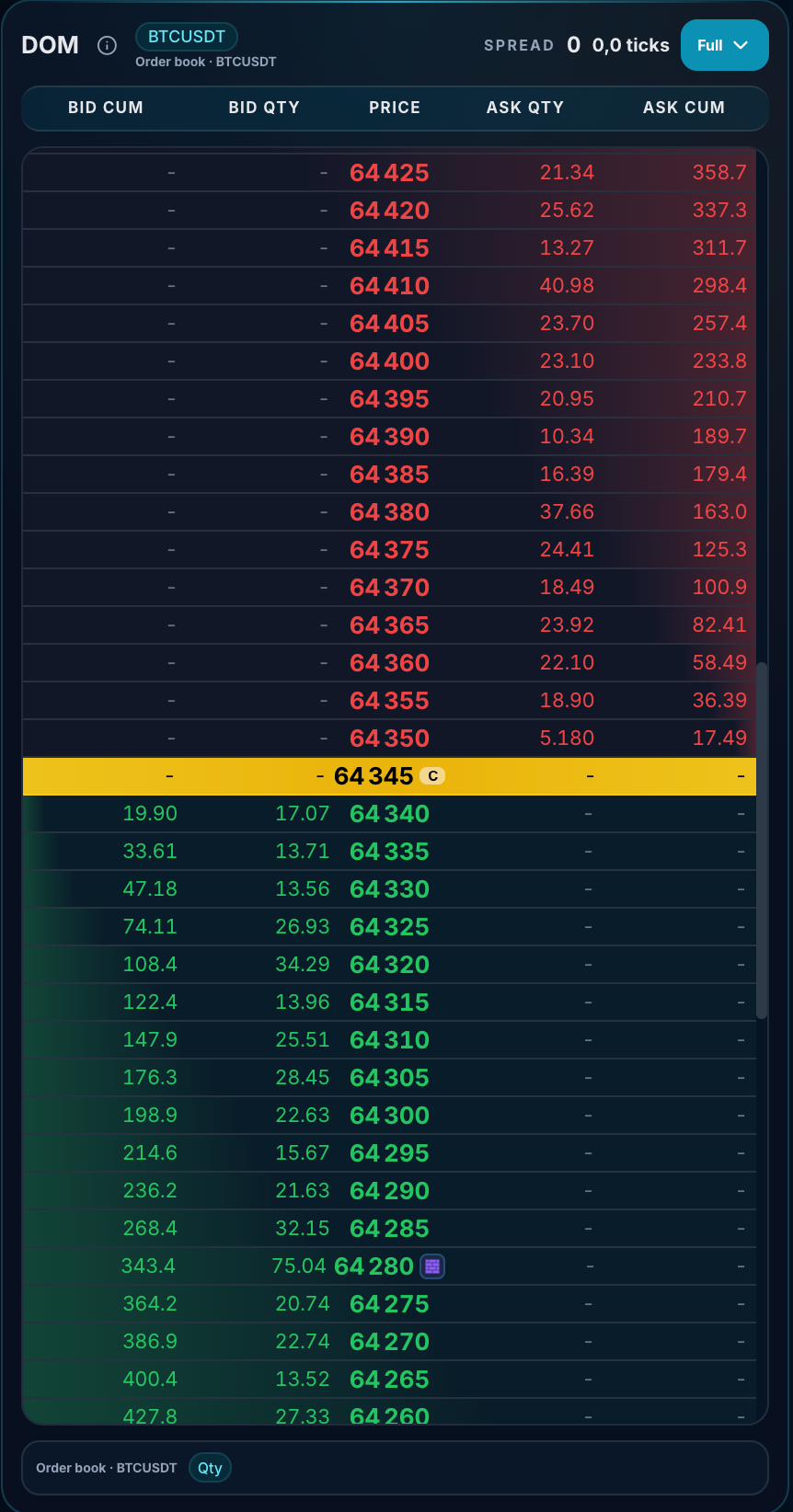
Full / Focus changes presentation only. It does not change the order book, official FT Mark, active position, Stop Loss, Take Profit, P&L, or account rules.
Focus Mode in one sentence
Use the Full / Focus control to switch between expanded controls and a ladder-first presentation.
Full Mode vs Focus Mode
| Area | Full Mode | Focus Mode |
|---|---|---|
| Symbol and spread | Visible | Visible |
| Best Bid / FT Mark / Best Ask cards | Visible | Reduced or hidden to release vertical space |
| Book Liquidity summary | Visible | Reduced or hidden |
| Grouping and visible-row controls | Visible | Reduced or hidden |
| Follow / Center controls | Visible | Reduced while the active setting continues to apply |
| Bid Cum / Bid Qty / Price / Ask Qty / Ask Cum | Visible | Visible |
| Entry / Stop Loss / Take Profit markers | Visible when relevant | Visible when relevant |
| Ladder height | Balanced with controls | Prioritized |
What remains visible in Focus Mode?
- The selected market.
- The current official FairTicks mark or market reference.
- Best Bid and Best Ask information.
- The price ladder.
- Bid and Ask depth colors.
- Entry marker.
- Stop Loss marker.
- Take Profit marker.
- Compact Bid Depth, Ask Depth, Imbalance, and Qty/USD information.
It changes layout only. It does not change official price, market data, order validation, Stop Loss, Take Profit, exposure, position size, or account risk rules.
How to switch layouts
Use the Full / Focus control in the upper-right area of the DOM. The label and arrow show the available layout action or current presentation, depending on screen size.
Expanded controls → more market references and display controls around the ladder.
Ladder-first view → fewer secondary controls and more visible price rows.
Remembering your preference
FairTicks can save the DOM preference in local browser storage so the same device can reopen the ladder in the previously selected mode.
On supported browsers, the selected DOM layout can be remembered locally on the current device. Clearing browser data can reset the preference.
Browser storage is local to the device and browser. Another device or cleared browser storage can return to the default layout.
Using markers in Focus Mode
Entry, Stop Loss, and Take Profit markers continue to work in Focus Mode. The compact layout does not remove position-management actions.
| Marker | Purpose | Available in Focus Mode? |
|---|---|---|
| Entry | Shows the position’s official entry reference. | Yes |
| Stop Loss | Shows the active loss-exit level. | Yes |
| Take Profit | Shows the active profit-exit level. | Yes |
Moving Stop Loss and Take Profit
Where supported, you can manage SL and TP from the ladder in either mode:
- Click or tap a valid price row.
- Drag the active marker on desktop.
- Use auto-scroll when dragging near ladder edges.
- Wait for backend confirmation before treating the new level as official.
Follow and Center behavior
Full Mode exposes Follow and Center controls more prominently. Focus Mode prioritizes the ladder itself, but the DOM can continue following the market according to the active configuration.
Re-centering or following the market changes what part of the ladder is visible. It does not open, close, or modify a position by itself.
Liquidity information when space is reduced
The ladder-first presentation prioritizes price rows. Detailed liquidity cards may be reduced, but the ladder still communicates side and depth through:
- Green bid rows below the current reference area.
- Red ask rows above the current reference area.
- Per-level quantities.
- Cumulative bid and ask quantities.
- The selected quantity or USD display unit where available.
Switch back to the expanded view whenever you want the dedicated nearby-liquidity percentages, wall summary, grouping, row count, Follow, and Center controls.
What you are seeing in the screenshots
These identify the market and preserve the core Bid Cum, Bid Qty, Price, Ask Qty, and Ask Cum reading workflow.
Best Bid, FT Mark, Best Ask, nearby liquidity balance, and wall information help you understand the current visible book.
FT Tick or other grouping, visible rows, Follow, Center, and Qty / USD controls let you tune the ladder presentation.
Secondary cards are reduced so the trader can monitor a wider vertical sequence of live bid and ask levels.
Focus Mode on desktop
Desktop users gain more visible ladder rows and can keep drag-based marker management. Focus Mode is useful when the DOM is one panel among charts, Open Positions, Risk Monitor, and Account Snapshot.
Focus Mode on mobile
On smaller screens, the compact layout reduces unnecessary vertical scrolling and preserves the essential ladder area. Tap-based marker actions remain more important than drag interactions on touch devices.
When Focus Mode can help
- When the ladder has limited vertical space.
- When monitoring several panels at once.
- When Entry, SL, and TP levels matter more than secondary controls.
- When using a smaller laptop or mobile screen.
- When the trader wants a cleaner order-flow view.
When Full Mode can help
- When adjusting grouping and row settings.
- When reviewing expanded market information.
- When learning the DOM for the first time.
- When changing Follow or Center behavior.
- When more visible controls are preferred over ladder height.
Common mistakes to avoid
| Mistake | Correct understanding |
|---|---|
| Thinking Focus Mode hides risk rules | It changes layout only; Account Snapshot and Risk Monitor remain authoritative. |
| Thinking marker movement is instant | The update must be confirmed by FairTicks. |
| Thinking compact depth predicts price | Depth and imbalance are context, not certainty. |
| Expecting the setting on another device | The saved preference is browser-local. |
| Expecting every secondary control to remain visible | Switch back to the expanded view whenever you need the full set of DOM controls. |
Common questions
Does Focus Mode change the number of market prices?
It increases the visible ladder area, but it does not change the official market data itself.
Can I open or manage positions in Focus Mode?
Yes, subject to the normal account and market validations.
Are Entry, SL, and TP still visible?
Yes.
Can I move SL and TP?
Yes, where supported, with the same backend confirmation requirements as Full Mode.
Why did the DOM reopen in Full Mode?
Browser storage may have been cleared, another browser may be in use, or the saved setting may not exist on that device.
Summary
DOM Focus Mode reduces secondary controls, preserves the essential ladder and trade references, and gives price levels more space without changing trading behavior.
Full Mode shows more controls; Focus Mode shows more ladder.
Focus Mode removes visual weight, not essential information.
Use the Full / Focus control to switch between a control-rich DOM and a ladder-first DOM.